
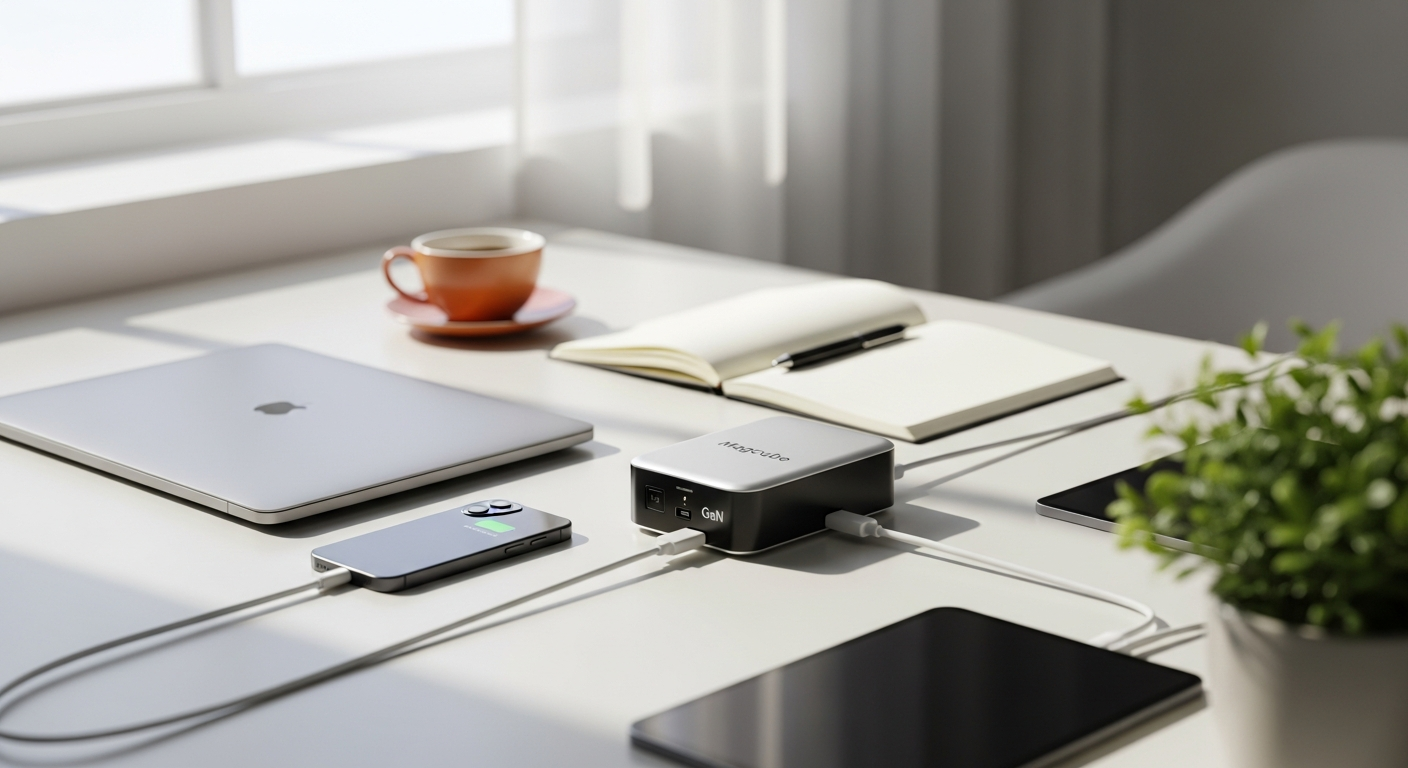
Discover how the AOHI Magcube 100W GaN Fast Charger keeps remote professionals powered up with dual-port charging and ultra-portable design. Learn why it's the go-to charger for nomadic lifestyles.
Intelligent Power in Your Pocket: The AOHI Magcube 100W for Remote Professionals
Remote workers and digital nomads face a relentless challenge: keeping multiple devices charged while constantly on the move. Battery anxiety is real. Whether you're working from a coffee shop, co-working space, or a beach in Bali, one dead laptop or phone can derail your entire workday—and your income. The stakes are high when your devices power your livelihood.
This is where the AOHI Magcube 100W GaN Fast Charger enters the picture. Built with next-generation Gallium Nitride technology, this charger delivers 100 watts of pure charging power in a form factor so compact it barely takes up space in your travel bag. It's engineered specifically for professionals who refuse to compromise between power and portability, and it's quickly become the go-to choice for remote workers worldwide.
Discover how the AOHI Magcube 100W can transform your mobile office setup today.
Why Remote Workers Are Ditching Multiple Chargers for the AOHI Magcube 100W
The traditional remote worker's charging reality involves a bulging bag of cables and adapters. Your phone charger lives in one pocket. Your laptop charger occupies its own slot. Your tablet charger? That's a third item taking up precious real estate. When you're moving between locations constantly, this accumulation of charging equipment becomes a genuine burden.
The Magcube 100W eliminates this problem entirely. A single charger replaces what previously required two or three separate units. For frequent travelers, this means less weight, fewer cables tangling in your backpack, and one less thing to remember when packing for the next flight.
Consider a typical workday: you're at a coffee shop with your MacBook Pro running low on battery, and your smartphone's charge is dwindling. With traditional chargers, you'd need to choose which device gets priority, or find a table with multiple outlets. With the Magcube, both devices charge simultaneously through its dual USB-C ports.
The psychological benefit deserves attention too. Knowing you have 100 watts of charging capacity on hand eliminates the anxiety of device-related emergencies. Your productivity workflow no longer depends on hunting for available power outlets or rationing your battery usage throughout the day.
Cost savings accumulate quickly. Most remote professionals own separate chargers from different manufacturers—Apple chargers for MacBooks, Samsung chargers for tablets, standard USB chargers for phones. Consolidating to one high-powered unit means you're no longer replacing individual chargers as they wear out or malfunction.
For frequent travelers, weight matters more than most people realize. The Magcube weighs just 0.44 pounds with dimensions of 2.36 x 2.36 x 1.26 inches. Add the foldable prongs (available on the US version), and you've got a charger that genuinely fits in a jacket pocket. Compare that to traditional 100W chargers, which often resemble small bricks, and you understand why portability becomes a game-changer.
Dual USB-C Ports and Intelligent Power Allocation Explained
The architecture of the Magcube's dual ports represents sophisticated engineering. Both USB-C ports operate independently and simultaneously, each capable of drawing from the full 100W pool through intelligent power allocation technology. This means you're not limited to one device at a time.
When both ports are in use, the charger intelligently distributes power based on connected device needs. Typical configurations include 65W for a power-hungry laptop paired with 35W for a smartphone, or an even 50W/50W split if both devices have similar power requirements. The system dynamically adjusts as you unplug devices or change what's connected.
Real charging speed demonstrates the practical advantage. The Magcube can charge a 16-inch MacBook Pro from 0% to 100% in approximately 1.8 hours. If you need a quick top-up, reaching 45% charge takes just 30 minutes—enough to power through an afternoon of work before your next break.
The intelligent allocation means you're not watching one device charge slowly while the other hoards all available power. PD 3.0 fast-charging protocol support ensures broad compatibility across major device ecosystems. Whether you're using Apple, Android, Windows, or any modern USB-C powered device, the charger adapts automatically.
Scenario planning reveals where this technology shines. During a video conference, you can charge both your laptop and backup smartphone. If your phone battery is critical but your laptop is already at 80%, the system recognizes this and prioritizes accordingly. You get exactly what you need without manual adjustments.
Compared to using two separate chargers, the Magcube's simultaneous performance maintains consistent speed for both devices. You're not sacrificing charging velocity for convenience—you're gaining both.
GaN Technology: Why It Matters for Your Mobile Office Setup
Gallium Nitride (GaN+) technology represents a fundamental shift from traditional silicon-based chargers. Where silicon generates substantial heat during power conversion, GaN operates at higher efficiency with significantly lower thermal output. This distinction matters more than it might initially appear.
Heat dissipation directly affects longevity. Chargers that run cool extend the lifespan of your devices by reducing thermal stress on batteries. If you're relying on your devices for your livelihood, this temperature difference compounds over months and years of daily charging cycles.
Energy efficiency improvements mean the Magcube consumes less power from the wall outlet while delivering the same 100W output to your devices. Your electricity bills decrease slightly, but more importantly, you're reducing environmental impact with each charge.
The size-to-power ratio is genuinely impressive. Most chargers delivering 100W occupy several times the Magcube's footprint. GaN technology allows manufacturers to pack equivalent power into a device you can hold in your palm. This capability directly enables the portability that makes the Magcube practical for nomadic professionals.
Durability advantages emerge for professionals who charge devices multiple times daily. The cooler operating temperature, combined with GaN's inherent stability, means the charger can handle sustained high-power sessions without degradation. You're not worrying about thermal throttling or component fatigue.
Safety features are baked into GaN architecture. Over-current protection prevents damage if you accidentally short a port. Over-voltage protection safeguards devices from power surges. Overheating protection automatically shuts down if internal temperatures climb too high. Short-circuit detection stops current flow instantly if something goes wrong. These protections work together to ensure your expensive devices—and the charger itself—remain safe during every charging cycle.
From an environmental perspective, efficient charging technology reduces overall power consumption across your device fleet. When multiplied across millions of users worldwide, this efficiency translates into meaningful energy savings and reduced carbon footprint.
The Magline LED Display Cable: A Game-Changer for Power-Conscious Professionals
The included Magline USB-C to USB-C cable transforms a basic necessity into a diagnostic tool. Its integrated LED display shows real-time wattage, meaning you watch exactly how much power your devices are consuming during charging.
This real-time feedback solves problems that plague many remote workers. You've experienced the frustration of slow charging—the percentage bar crawling upward far slower than expected. With the LED display, you immediately see whether your device is drawing 10W, 50W, or the full 100W. If the number seems low, you've identified a charging bottleneck without guessing.
Troubleshooting becomes straightforward. Is your laptop charging slowly? Check if you're on a lower-power outlet or if the cable is faulty. Is your phone showing unexpected power draw? The LED tells you instantly whether a background app is causing excessive battery drain during charging.
The cable itself demonstrates quality construction. Premium materials withstand the constant coiling and uncoiling that portable professionals subject their cables to daily. You're not replacing this cable in a few months due to fraying or internal breaks.
For remote workers managing multiple devices, this visibility matters psychologically and practically. You're no longer passively hoping your devices charge adequately overnight. You're actively monitoring and confirming power delivery. If you're checking in from a time zone away and need to ensure your equipment is ready, the LED display cable gives you confidence in your charging setup.
Integration with the Magcube is seamless. The cable connects to either USB-C port, and the display activates immediately. No pairing, no setup, no guesswork—just instant visual feedback about your charging session.
Practical use cases expand beyond basic monitoring. You might discover that one of your devices charges significantly faster than another, revealing hardware differences or battery condition. You might notice seasonal patterns—perhaps your devices draw less power in cooler environments. Over time, this data awareness helps you optimize your charging routine and detect when batteries need attention.
Portability Features That Make Nomadic Life Easier
Portability isn't just about size; it encompasses every aspect of how a device integrates into travel life. The Magcube achieves this through thoughtful engineering across multiple dimensions.
Compact dimensions (2.36 x 2.36 x 1.26 inches) and lightweight construction (0.44 lbs) mean the charger barely registers in your carry-on luggage. Most remote professionals who travel regularly face the constant calculus of weight and space. Every ounce matters when you're walking between train stations or changing hotels frequently. This charger doesn't force that trade-off.
Foldable prongs on the US version eliminate a common frustration: bulky charger cords jutting out of your bag. With the prongs folded, the Magcube fits into the smallest gaps in your packing arrangement. It's actually smaller in your bag than many smartphone chargers.
Comparison with traditional 100W chargers reveals just how dramatic this difference is. Most competing 100W chargers weigh significantly more and occupy space more closely resembling a small paperback book than a device you can pocket. The Magcube's GaN technology enables what traditional silicon chargers simply cannot achieve.
Thermal management deserves specific attention for nomadic professionals. As you charge devices in various environments—warm tropical climates, enclosed bus seats, hotel rooms with limited ventilation—the Magcube's GaN technology keeps it running cool. You're not burning your fingers removing the charger from tight spaces, and you're not worrying about heat damage to surrounding items in your bag.
International travel considerations matter too. While the US version features foldable prongs, the Magcube supports various outlet types, and its 100-240V input handling means you can charge it anywhere in the world. You might need a simple plug adapter for different countries, but the charger itself requires no voltage converters.
Build quality for frequent travelers focuses on durability through regular handling. This charger is engineered to survive constant movement, temperature variations, and the general wear of nomadic life. It's not a fragile device requiring careful storage—it's built for professionals who prioritize reliability over fragility.
Aesthetic design shouldn't be overlooked. If you're working from co-working spaces or client offices, your equipment represents part of your professional image. The Magcube's sleek design looks appropriate in shared workspaces, unlike some chargers that appear more suited to a workshop than a coffee shop.
Real-World Performance: Charging Scenarios for Remote Professionals
Theory means little without practical application. Consider how the Magcube performs in the actual situations remote professionals face daily.
Scenario 1: Powering a 16-inch MacBook Pro while charging an iPhone simultaneously. You're at a coffee shop, and both devices need charging. The Magcube allocates approximately 65W to your MacBook and 35W to your iPhone. Your laptop reaches 45% charge in 30 minutes, enough to handle the afternoon's work. Your phone charges to 80% in roughly the same timeframe. Both devices are ready when you need them, and you've used one outlet and one charger instead of hunting for multiple power sources.
Scenario 2: Charging two laptops during a video conference. You're running a presentation on your primary laptop while your backup device charges. The Magcube distributes power evenly or intelligently based on device requirements. Your primary device maintains sufficient charge for the entire meeting, while your backup reaches operational charge level before you need to switch. This scenario eliminates the anxiety of device failure mid-presentation.
Scenario 3: Rapid top-up charging before heading to a meeting. You have 30 minutes before an important video call, and your MacBook is at 10%. The Magcube's 100W output gets you to 45% charge in 30 minutes—enough battery to sustain the meeting and handle immediate follow-up work without the charge anxiety that often accompanies tight timelines.
Scenario 4: Overnight charging for a full device fleet. You're staying in an Airbnb with limited outlets. You charge your laptop, phone, and tablet overnight using the two ports and a powered hub if needed. Morning arrives with everything fully charged, ready for the full workday.
Battery anxiety elimination represents the most valuable benefit across all scenarios. Remote professionals operate with constant awareness of device charge levels. This mental load—constantly checking percentages, calculating how long you can work, planning your day around charge cycles—simply disappears when you know you have 100W of charging capacity available.
Performance consistency across different outlet types and power sources matters in real-world travel. Hotels, coffee shops, co-working spaces, and airports all have varying power quality. The Magcube's intelligent charging adapts to these variations, maintaining consistent power delivery regardless of inlet conditions.
Handling peak demand situations during intensive work sessions means you can maintain productivity without charging compromises. If your workday involves video conferencing, content creation, or other power-intensive activities, the Magcube ensures your devices never become a limiting factor.
Investment Analysis: Is the AOHI Magcube 100W Worth $86?
At $86, the Magcube occupies a specific price point in the charger market. Understanding its value requires examining what you're comparing it against.
Price comparison with competing 100W GaN chargers reveals that $86 falls into the mid-range. Some competitors offer slightly lower prices, but often with compromises on build quality, port design, or included accessories. Others charge $20-30 more for marginal performance differences. The Magcube positions itself as the value leader in its category.
Cost-per-charger calculation matters for remote professionals replacing multiple single-device chargers. If you previously owned a $30 MacBook charger, a $25 iPhone charger, and a $35 tablet charger, you've invested $90 in devices that only work with one device each. The Magcube replaces all three. You're not spending more—you're spending the same while gaining dual simultaneous charging and portability.
Longevity and durability ROI extends over years of daily use. A charger you replace every 18 months costs more than one lasting 4+ years. The Magcube's GaN technology and robust construction support extended lifespan, making the per-year cost surprisingly economical.
Warranty coverage and customer support provide safety nets. Understanding what protection comes with your investment matters for expensive devices charged through this unit. The Magcube typically includes manufacturer warranty covering defects and reliability issues.
Resale value and upgrade path considerations acknowledge that technology evolves. If USB-C standards change or more powerful chargers become necessary, you could resell the Magcube to recoup a portion of your investment. Its popularity means secondary markets exist for used units.
Hidden savings emerge from travel efficiency. Emergency charging purchases while traveling cost far more than $86. You've all experienced airport vendor chargers priced at $40-60 because you forgot yours. You've paid for hotel room service to deliver a charger. One reliable device eliminates these costly mistakes.
Value proposition differs across professional archetypes. Freelancers managing client sites benefit enormously from consolidated charging. Remote employees working from home offices benefit from the equipment consolidation. Digital nomads and entrepreneurs—operating across time zones with minimal infrastructure—gain arguably the highest value.
Honest Limitations and Who Might Want to Look Elsewhere
No product serves every user perfectly, and honest assessment requires acknowledging where the Magcube might not be ideal.
Size comparison with lower-wattage GaN chargers reveals that some users may find the Magcube slightly bulkier than expected. If you primarily charge one smartphone and never need laptop charging, a 65W GaN charger might be more compact. The Magcube optimizes for power at the expense of minimal bulk, which is the right trade-off for most professionals but not universally.
Power sharing trade-offs when using both ports simultaneously deserve consideration. If you regularly need 100W on two devices at once, the Magcube cannot accommodate both at maximum power. You'll receive something like 60W and 40W instead. For most situations this works fine, but professional videomakers, engineers running processor-intensive software, or others with extreme power demands might find this limiting.
Cable length considerations with the included Magline cable matter for workspace setup. The cable length might feel short if you prefer charging devices at a distance from your power outlet. You'd need an extension cable, adding to your travel kit.
Situations where a single-port charger might be more practical exist primarily for users who never charge multiple devices simultaneously. If you charge devices sequentially or rarely have two devices needing power at the same time, the dual-port capability adds complexity you don't need.
Heat dissipation during sustained high-power charging sessions generally remains within safe parameters, but the charger does warm up under continuous load. This is normal and expected for 100W GaN chargers, not a defect, but users concerned about heat should be aware that GaN doesn't mean zero thermal output—just significantly reduced thermal output compared to alternatives.
Compatibility edge cases with older or proprietary charging standards exist. USB-C is dominant among modern devices, but certain older electronics or specialized equipment might use different connectors. The Magcube is thoroughly modern in this respect, which is perfect for current technology but not for legacy equipment.
When a smaller, lower-wattage charger might better suit needs: if you travel with minimal gear, stay in well-powered locations, or primarily use devices with moderate charging demands, you might be over-specced with the Magcube 100W. A 65W GaN charger might serve equally well at a lower price point.
Setting Up Your AOHI Magcube 100W for Maximum Efficiency
First-use checklist ensures everything functions correctly before you depend on it for critical work. Unbox the charger and inspect the cables for any damage. Test the included Magline cable by connecting both ports to devices and confirming the LED display illuminates with accurate wattage readings. Verify that charging actually begins—you'll see the LED display show real-time power delivery.
Optimal placement for heat dissipation in your workspace matters even though GaN technology minimizes heat. Place the charger where air can circulate around it rather than enclosed in tight spaces or under piled items. If you're setting up a permanent charging station at home, a small shelf or stand allows air flow underneath.
Cable management strategies for organized charging stations keep your workspace functional and safe. Use cable ties or velcro straps to organize the charging cables neatly. Prevent cables from dangling where you might trip or where they could be stepped on. Create a designated charging area so your devices and charger have a consistent home.
Firmware updates or software considerations apply minimally for a power adapter, but stay aware of any manufacturer advisories. Quality manufacturers occasionally release updates addressing safety protocols or compatibility improvements.
Testing with your specific device ecosystem confirms compatibility before you're in a critical situation. Connect each device you plan to charge—laptop, phone, tablet—and observe the charging behavior. Confirm that the LED display shows appropriate wattage for each device. Check that dual-port charging works as expected with your two most commonly paired devices.
Creating a charging routine that maximizes battery health involves understanding optimal charging practices. While the Magcube doesn't control when devices charge, you can develop habits. Some professionals keep devices charged between 20-80% to maximize long-term battery lifespan. Others prefer fully draining and recharging occasionally. The Magcube accommodates either approach without restriction.
Troubleshooting common setup issues typically involves cable concerns. If charging seems slow, verify you're using the included Magline cable rather than an older cable that might not support full power delivery. If the LED display doesn't illuminate, try different outlets or cables to isolate the issue. These situations resolve quickly, and the Magcube's reliability means genuine problems are rare.
The Nomadic Professional's Charging Ecosystem
The Magcube functions best within a comprehensive charging strategy rather than as an isolated purchase. Building complete charging infrastructure around this device optimizes your entire mobile office.
Complementary cables and accessories worth considering extend the Magcube's utility. Extra USB-C to USB-C cables positioned at different work locations eliminate the need to constantly move your single Magline cable. A small cable bag keeps everything organized during travel. A portable charging pad provides additional options for compatible devices.
Backup charging solutions for extended trips ensure you're never stranded. A quality USB-C power bank (25,000-30,000 mAh) handles emergency situations and provides charging when no outlets are available. This is insurance against rare situations where you're without power longer than expected.
Power bank pairing strategies create true off-grid scenarios. The Magcube charges your power bank at maximum speed, and the power bank charges your devices during periods without outlets. This combination handles even challenging travel situations.
Integrating the Magcube into your travel tech kit means assigning it a permanent spot in your carry-on or primary backpack. Never pack it separately or leave it behind. The Magcube is as essential as your laptop or phone—it deserves equivalent prioritization in your packing routine.
Cloud-based device management for remote workers complements the charging strategy. Using cloud storage ensures you're not dependent on any single device functioning. If a device dies despite your charging efforts, you immediately access your critical work from another device.
Future-proofing your charging setup as device wattage demands increase means understanding that USB-C power delivery standards continue evolving. The Magcube's 100W capacity handles current devices comfortably, and the PD 3.0 standard ensures compatibility with future devices within reasonable power bands. You're unlikely to need a more powerful charger for several years.
The Bottom Line for Your Mobile Office
The AOHI Magcube 100W GaN Fast Charger isn't just another power adapter—it's a strategic investment in your remote work lifestyle. For digital nomads and location-independent professionals, this charger eliminates the constant juggling act of managing multiple devices with limited charging capacity. The combination of 100W output, dual-port intelligence, and genuinely portable design addresses the core pain points that plague remote workers everywhere.
You're getting a charger that consolidates what used to require two or three separate units. The included LED display cable transforms charging from a passive activity into an informed one, letting you monitor exactly what your devices are consuming. The GaN technology ensures you're not sacrificing efficiency or safety for that compact form factor.
At $86, you're paying roughly what you'd spend on two mid-range chargers—except this one is smaller, more powerful, and far more versatile. The minor trade-offs—power sharing when both ports are active, slightly larger than some single-port alternatives—pale in comparison to the freedom and flexibility this charger delivers.
If your work takes you across time zones and continents, if your productivity depends on keeping multiple devices alive, or if you simply refuse to be tethered to a desk with a tangle of cables, the AOHI Magcube 100W deserves serious consideration. Your next project deadline won't wait for a dead battery. Make sure your charger won't either.