
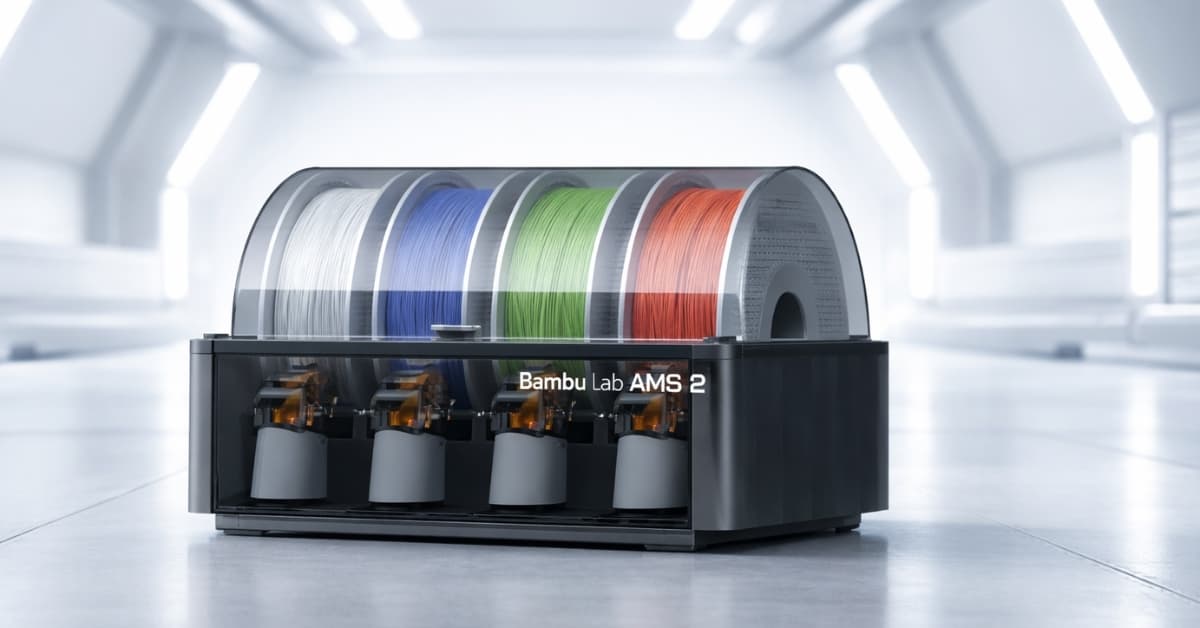
Bambu Lab AMS helps you master multi-material 3D printing with smart filament switching, cleaner colors, fewer failures, and faster, hands-off prints.
The frustration of stopping a long 3D print to swap filaments happens to almost every maker. Many users report wasted time and failed prints when manually changing colors or materials mid-job.
A smart add-on helps eliminate these interruptions and improves your workflow. The Bambu Lab AMS (Automatic Material System) takes over filament feeding and switching so you can leave the printer alone during complex jobs.
You get smoother transitions, fewer failed prints, and much less hands-on setup. Here’s a friendly guide to how the AMS works, official U.S. pricing, and how it fits into real printing projects.
What Is the Bambu Lab AMS and How It Works
The Bambu Lab AMS is a smart filament feeder system that works with supported Bambu Lab 3D printers to automate multi-material and multi-color printing.
It holds up to four filament spools and feeds them into your printer without manual swaps. It actively senses tension and helps prevent jams or run-outs, which are common problems in long or complex printing jobs.
RFID technology in the unit reads filament type and helps your printer apply optimal settings for each material. This automation reduces mistakes during setup and saves you time on each print.
Official U.S. Pricing and Models
Pricing from the official U.S. store shows clear options for different printing goals:
| System | U.S. Price (Approx.) | Key Feature |
|---|---|---|
| Standard Bambu Lab AMS | $249–$349 USD | Smart multi-filament switching with run-out detection and RFID control. |
| Bambu Lab AMS 2 Pro | $299–$359 USD | Active filament drying, airtight storage, faster feeding, and advanced material management. |
The standard AMS covers most users who want automated switching and smooth filament feeding. The AMS 2 Pro adds built-in drying up to about 65 °C and better environmental protection for moisture-sensitive filaments.
Key Features of the Standard AMS System
The core AMS unit brings important capabilities to your printer:
Automated Filament Feeding
It feeds up to four different filaments into your printer without stopping the print. RFID helps the system identify each spool and configure proper settings.
Run-out and Tension Detection
Sensors monitor filament tension and stop problems before they ruin prints. If one spool runs low, the system switches to the next automatically.
Multi-Color and Material Projects
You can combine colors or materials in a single project without manual intervention. This makes detailed designs and functional prints much easier to execute.
What the AMS 2 Pro Adds for Serious Makers
The AMS 2 Pro expands on the basic system with features that matter for advanced materials:
Active Filament Drying & Storage
Built-in drying reaches up to ~65 °C and helps reduce moisture in filaments like PETG or nylon, which negatively affects print quality. Airtight storage extends filament life.
Improved Feed Mechanisms
Brushless servo motors offer faster and more accurate filament movement, reducing feeding errors during complex prints.
Tool-Free Maintenance Access
You can clear jams or perform maintenance without special tools, which saves time when working with sticky or dust-prone materials.
How AMS Expands With Multiple Units
If you need more than four filaments, the system scales:
- You can link multiple AMS or AMS 2 Pro units to increase capacity.
- An AMS Hub accessory lets you chain units for big setups with up to 24 filaments.
- More spools mean you can include extra support materials or a wider color palette.
This modular design gives you more flexibility if you run frequent or varied printing tasks.
Printer Compatibility and Installation Tips
The AMS lineup works with most Bambu Lab printers, including the popular X1, P1, P2S, and H series models. The A1 Mini may need a specific adapter. Connecting AMS units requires proper routing of PTFE tubes and bus cables to ensure your printer recognizes them.
After setup in hardware, you use Bambu Studio software to configure the AMS units and assign filament positions. This is straightforward and lets you select filament order for your print jobs.
Practical Uses You’ll Notice
This system changes how you approach projects:
Creative Designs
You get crisp, multi-color objects without pausing to change spools.
Functional Parts
Combine flexible and rigid materials in the same print for items like custom grips or complex assemblies.
Production & Prototyping
Automation cuts down hands-on time, letting you queue prints and focus on other tasks. Larger filament setups mean longer batch runs with minimal supervision.
Limitations and What to Keep in Mind
No system is perfect, and knowing constraints helps:
- Drying operates best when filaments aren’t actively feeding. Planning your print queue can help you get the most from drying features.
- Highly flexible filaments or unusual materials may still require special attention.
- Regular cleaning of PTFE tubes and sensors improves reliability and filament performance.
These points help set expectations for day-to-day use.
Conclusion
The Bambu Lab AMS brings smarter filament handling to your 3D printer by automating what used to be a manual task. This system cuts down interruptions, improves print quality, and gives you more design freedom.
The standard AMS is a strong choice for multi-color printing, and the AMS 2 Pro adds drying and better performance for advanced materials. Explore how these tools fit your workflow to save time and get cleaner results.
Want better prints and fewer interruptions? Consider adding the right AMS system to your setup and start spending more time printing and less time swapping filaments.