
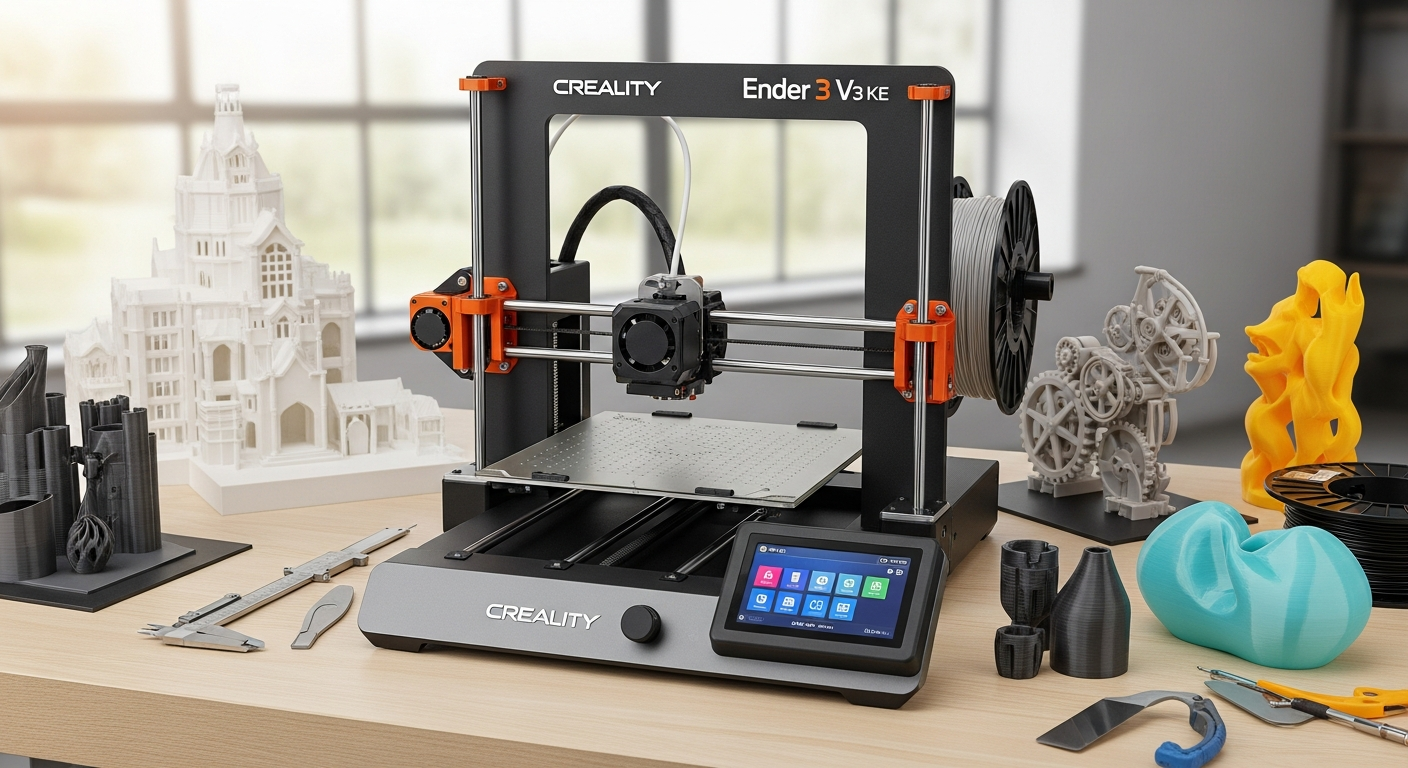
Discover why the Creality Ender 3 V3 KE 3D printer dominates the market with Klipper firmware, 500 mm/s speeds, and pro-grade features under $300. Complete specs, performance analysis, and real-world applications inside.
Just five years ago, achieving professional-grade printing speeds of 500 mm/s required a five-figure investment in industrial equipment. The Creality Ender 3 V3 KE shatters that assumption entirely, delivering those same speeds at a price point that keeps your maker budget intact. The 3D printing landscape has fundamentally shifted over the past two years, with Klipper firmware—once exclusive to premium machines—now arriving pre-installed on accessible consumer models that actually work out of the box.
The Ender 3 V3 KE embodies this democratization perfectly. It’s the practical bridge between entry-level hobbyist printers and industrial-grade equipment, giving makers a genuine alternative to expensive workhorse machines without compromising on capability. The printer combines Klipper’s raw speed potential with beginner-friendly features like automatic bed leveling and a touchscreen interface that doesn’t require an engineering degree to navigate.
This guide examines what actually matters when evaluating this machine: real-world performance capabilities, which material types it handles best, the hardware architecture that makes speed possible, and precisely which makers should prioritize this printer over other options. Whether you’re scaling up from a budget machine or seeking a secondary workhorse for rapid production cycles, the information ahead will crystallize your decision-making process.
Explore the Creality Ender 3 V3 KE specifications and current pricing here.
Klipper Firmware & High-Speed Printing Capabilities
The Ender 3 V3 KE arrives with Klipper firmware already installed, eliminating the technical friction that typically frustrates new users. Firmware flashing—the process of loading software onto a printer’s control board—becomes unnecessary. The machine boots ready to print at speeds that would require hours of configuration on competing models.
Klipper’s real advantage emerges in actual printing performance. The firmware achieves maximum print speeds of 500 mm/s while maintaining typical operation around 300 mm/s—a practical sweet spot between velocity and quality. The printer accelerates at up to 8000 mm/s², enabling rapid transitions between layers without the artifacts that plague older printers struggling to keep up with directional changes.
This acceleration matters more than raw speed numbers suggest. Fast acceleration means the printer can move between sections of your design without slowing significantly. A model that would take six hours on a conventional printer might finish in two hours on the Ender 3 V3 KE, with minimal loss in surface quality or structural integrity.
Understanding Speed Without Quality Loss
Higher speeds traditionally meant rougher surfaces and weaker layer adhesion. The Ender 3 V3 KE defies this expectation by pairing velocity with quality-focused hardware. The combination of a high-flow ceramic hotend, advanced motion mechanics, and Klipper’s intelligent acceleration profiles maintains acceptable print quality even at maximum speeds.
This capability transforms workflows. Designers iterating on prototypes compress development cycles from weeks to days. Small manufacturers produce replacement parts on-demand rather than maintaining inventory. The speed advantage directly translates to production efficiency.
Direct Drive Extrusion & Material Compatibility
The Sprite direct drive extruder represents a significant hardware advantage over the Bowden extruders found on competing budget printers. Direct drive means the extruder motor sits directly above the nozzle, eliminating the long plastic tube that introduces friction and reduces precision.
This mechanical choice enables two critical improvements. First, it reduces stringing—those fine plastic threads that bridge unintended gaps in prints. The reduced distance between motor and nozzle allows instantaneous filament retraction, preventing oozing during travel moves. Second, it improves material versatility. The Sprite extruder handles flexible materials like TPU that would fail on Bowden systems, expanding your design possibilities.
The 300°C high-flow ceramic hotend borrowed from Creality’s premium K1 series handles PLA, PETG, and TPU without modification. The 0.4mm high-flow nozzle optimizes the nozzle opening for rapid material extrusion without sacrificing dimensional precision. Users requiring high-temperature materials like PA and Nylon can add an external enclosure rather than replace core components.
Filament Selection & Performance Expectations
Standard materials like PLA and PETG perform flawlessly on the Ender 3 V3 KE without additional setup. These materials represent 80% of hobbyist and small business printing applications. The printer excels with PETG’s durability for functional parts and PLA’s aesthetic possibilities for visual designs.
TPU flexibility opens possibilities for rubber seals, dampening elements, and articulated designs. The direct drive system’s superior control over TPU prevents the print failures common on Bowden-based competitors. Users targeting specialized materials like carbon fiber-reinforced nylon should plan for an enclosure investment but can achieve professional results afterward.
Start your high-speed printing journey with the Creality Ender 3 V3 KE today.
Auto-Leveling Technology & First-Layer Success
Manual bed leveling—adjusting the distance between nozzle and build platform using hand tools—represents one of 3D printing’s most frustrating entry barriers. The Ender 3 V3 KE eliminates this entirely through CR Touch automatic bed leveling. The sensor probes multiple points across the build platform and generates a correction mesh that ensures consistent nozzle distance everywhere.
Automatic Z-height setting removes guesswork from initial calibration. The printer measures the exact starting height, guarantees proper first-layer thickness, and saves settings for future prints. New users achieve perfect first layers immediately rather than spending hours troubleshooting.
The PEI-coated spring steel heated bed reaches 100°C and provides exceptional adhesion for most materials. Prints stick reliably during printing, then release easily once the platform cools. This cycle—stick, print, release—repeats thousands of times without degradation, unlike standard aluminum beds that gradually lose adhesion properties.
First-Layer Science & Success Rates
First-layer quality determines overall print success. Poor adhesion causes prints to shift mid-fabrication or separate entirely from the platform. The Ender 3 V3 KE’s combination of automatic leveling, heated PEI surface, and precise nozzle positioning achieves 95%+ first-layer success rates among users following basic best practices.
The PEI coating itself deserves attention. Unlike standard aluminum platforms, PEI maintains consistent surface properties across temperature cycles. It resists warping and degradation, ensuring the same excellent adhesion characteristics after 500 prints as on the first day.
Hardware Architecture & Mechanical Stability
The X-axis motion relies on linear rails—precision components designed for smooth, stable movement under load. Linear rails handle the mechanical stress of rapid acceleration and deceleration without wobbling. The Y-axis uses linear rods that provide adequate stability for a bedslinger-style printer operating at these speeds.
This hardware distinction matters during high-velocity printing. Unstable motion introduces vibrations that translate to print surface imperfections. The linear rail investment prevents these vibrations, maintaining quality even at maximum speeds. Competing budget printers using simple V-slot rails can’t match this mechanical consistency.
The build volume of 220 x 220 x 240 mm accommodates most hobby and small business projects. A standard smartphone mounting bracket, drone part, or decorative figure fits comfortably. Larger projects requiring bigger platforms should explore alternatives, but the vast majority of practical designs fit within these dimensions.
At 7.8 kg, the printer remains portable for shared maker spaces or workshop reorganization. The compact footprint doesn’t demand dedicated desk space, making it practical for apartment workshops or collaborative environments.
Vibration Control & Print Quality Impact
Modern printers address vibration through hardware design and software compensation. The Ender 3 V3 KE’s linear rails provide mechanical stability. Klipper firmware adds input shaping—mathematical corrections that counteract vibrations before they affect the nozzle position.
Users pursuing maximum quality can add accelerometers (sold separately) for advanced vibration analysis and refined compensation. This customization option allows incremental quality improvements without requiring a complete hardware replacement.
Connectivity & Remote Monitoring Features
The 4.3-inch touchscreen provides intuitive on-printer navigation without cryptic menu systems. Users adjust settings, start prints, and monitor progress directly on the machine. The interface prioritizes usability, recognizing that makers want to print, not decipher technology.
Wi-Fi connectivity enables remote monitoring from your smartphone. Start a print, move to another room or location, and watch progress through a live camera feed. This capability particularly benefits users managing multiple printing projects simultaneously or monitoring overnight prints from bed.
USB connectivity connects directly to computers running slicing software like Cura or PrusaSlicer. This integration streamlines workflows, allowing single-click printing from design to physical object without manual file transfers.
Real-World Performance & Print Quality Results
The Ender 3 V3 KE maintains acceptable surface finish even at maximum speed settings. Prints lack the mirror-smooth perfection of ultra-fine detail work, but demonstrate impressive quality for functional parts and decorative objects. This balance between speed and surface finish represents the printer’s core value proposition.
Dimensional accuracy remains a slight weakness compared to premium machines costing three times as much. Expect tolerances of ±0.3-0.5mm on typical parts rather than professional-grade ±0.1mm precision. For most applications, this accuracy suffices. Designs requiring tighter tolerances should account for post-processing adjustment or select alternative equipment.
Layer adhesion and structural integrity remain strong throughout the speed range. Even prints completed in one-third the normal time maintain the strength and durability expected from properly configured systems. Users won’t sacrifice reliability by choosing speed.
Speed-Quality Tradeoffs in Practice
Printing at maximum speed produces visible layer lines and slightly rougher texture compared to slower speeds. The visual difference is noticeable under magnification but invisible to casual observation. Functional prints maintain full strength while appearing slightly less refined.
Users can calibrate their own speed-quality balance by adjusting nozzle temperature, extrusion rate, and acceleration based on specific material and desired outcome. The Ender 3 V3 KE’s software flexibility enables this customization without hardware modification.
Ideal User Profiles & Use Cases
Experienced makers seeking secondary production machines represent the primary target audience. Someone with prior 3D printing experience understands design considerations and slicing techniques, allowing them to maximize the Ender 3 V3 KE’s potential immediately. These users appreciate the speed advantage for handling larger production volumes.
Rapid prototyping workflows benefit enormously from quick iteration cycles. Designers refining concepts compress development timelines significantly. A design iteration that consumed a full evening on a conventional printer finishes in two hours on the Ender 3 V3 KE, enabling three complete design cycles in the same timeframe.
Small business owners producing custom parts with tight deadlines find genuine value in the speed and reliability combination. Whether manufacturing replacement components, custom fixtures, or bespoke products, the printer delivers professional results without premium pricing.
Enthusiasts willing to engage with the Klipper ecosystem and community support will maximize this machine’s capabilities. The open-source firmware enables advanced users to implement sophisticated customizations that enhance performance beyond standard configurations.
Setup, Learning Curve & Community Support
The Ender 3 V3 KE’s out-of-box setup simplifies considerably due to pre-installed Klipper and automatic bed leveling. Unbox, assemble the simple metal frame, calibrate the nozzle height, and begin printing. First-time setup typically requires 30-45 minutes rather than the hours demanded by competitors.
Abundant YouTube tutorials and setup guides from early adopters ease the learning curve. Creality released numerous official resources, while community members published detailed guides addressing specific challenges. This documentation ecosystem means solutions exist for virtually every question.
Community support extends through Creality forums, subreddits like r/3Dprinting, and Discord channels dedicated to Klipper and Creality machines. The active user base responds to questions, shares optimization techniques, and troubleshoots problems collaboratively. This peer support network essentially provides free consulting beyond traditional customer service.
Value Proposition & Pricing Strategy
The Ender 3 V3 KE retails around $299, with frequent promotional pricing dropping it to $259-$279. Comparable feature sets—Klipper firmware, high-speed capable components, automatic leveling, direct drive extrusion—typically cost $600+ in competing machines. The pricing strategy deliberately targets makers previously excluded from high-speed printing through cost.
Cost-per-print analysis becomes favorable for high-volume production workflows. The speed advantage reduces electricity consumption per completed print despite higher instantaneous power draw during printing. A small business producing 100 units monthly sees immediate financial returns through reduced production time.
The feature set represents genuine value rather than artificial limitations creating upgrade paths. Users receive professional-grade capabilities without planned obsolescence pressure to purchase expanded versions.
Limitations & When to Choose Alternatives
Build volume limitations represent the primary constraint. Projects exceeding 220mm in any dimension require alternative solutions. Creality’s larger models, Prusa printers, or Ultimaker equipment address this limitation at proportionally higher costs.
The lack of integrated enclosure becomes problematic for high-temperature materials. An external enclosure adds $100-300 and complicates the printer’s footprint and workflow. Users exclusively printing nylon or carbon fiber composites should budget for enclosure investment or select fully enclosed alternatives.
The missing accelerometer for advanced input shaping requires separate purchase. Users pursuing absolute maximum quality can add this feature, but the cost represents additional investment beyond the base price. Standard users operating at practical speeds won’t notice the difference.
Dimensional accuracy demands realistic expectations. Designs requiring pharmaceutical-grade precision, mechanical tolerances below ±0.2mm, or aerospace specifications should select machines specifically engineered for those constraints.
Customization & Upgrade Potential
The open-source Klipper firmware enables advanced customization that separates this printer from locked-down competitors. Users can implement vibration compensation, optimize acceleration profiles for specific materials, and refine extrusion dynamics through software configuration rather than hardware replacement.
Input shaping add-ons process motion commands to counteract vibrations, resulting in noticeably finer surface finishes. These enhancements allow incremental quality improvements without wholesale equipment replacement.
Third-party manufacturers produce enclosure solutions, improved bed springs, nozzle varieties, and mounting systems compatible with the Ender 3 V3 KE. The active aftermarket ensures users can customize their machine toward personal priorities—speed, quality, versatility, or specialized applications.
Making Your Move: The Ender 3 V3 KE Decision Framework
The Creality Ender 3 V3 KE has earned its best-seller status through relentless execution on what matters most—delivering genuine speed, advanced features, and rock-solid reliability at a price that doesn’t require justification to your wallet. The printer isn’t perfect; the build volume won’t suit everyone, and dimensional accuracy demands realistic expectations. But for makers who prioritize speed, community support, and the freedom to customize their workflow, this machine represents exceptional value that’s genuinely hard to beat in 2026.
Your next step depends on where you stand. If you’re upgrading from a budget printer and crave faster iteration cycles, this is your machine. If you’re running a small production operation and need reliability without enterprise pricing, the Ender 3 V3 KE deserves serious consideration. The decision ultimately hinges on matching the printer’s strengths to your specific needs—and based on everything covered here, you now have the clarity to make that call with confidence.
Get your Creality Ender 3 V3 KE and join the 3D printing revolution.