
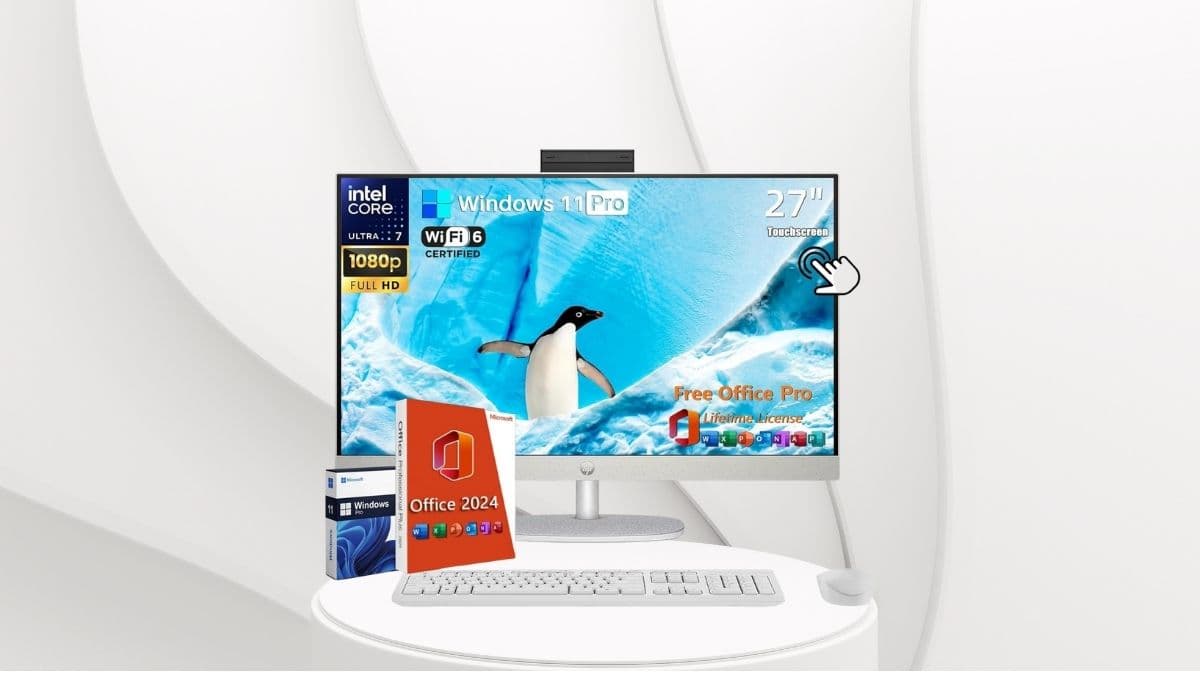
Looking for a desktop that handles it all? The HP 27 All-in-One blends pro-level performance, a clean design, and touchscreen convenience.
If there’s one thing 2025 demands from a desktop computer, it’s the ability to keep up—without taking over.
Our digital lives have become more connected, our workloads more complex, and our expectations more refined. That’s where the HP 27 All-in-One Desktop Computer enters the topic—not as another machine, but as a thoughtfully designed centerpiece for modern productivity.
When I first set it up, I was struck by its simplicity. No bulky towers. No nests of tangled cables. Just a sharp, 27-inch display housing everything you need behind it.
Within minutes, it was booted, connected, and running multiple applications with ease. With a user satisfaction rating of 4.6 out of 5 stars, it’s clear this isn’t just a spec sheet darling—it’s a system that actually delivers.
An Expansive, Intuitive Display That Pulls You In
At the heart of the HP 27 experience is its vibrant 27-inch Full HD touchscreen. It’s not just a pretty panel—it’s designed to be both visually engaging and practically useful.
The IPS technology behind it ensures that whether you’re reviewing a design draft, running a video call, or streaming content during a lunch break, colors stay rich and accurate across wide viewing angles. You don’t need to sit dead center to get the best view—everyone at the table sees the same high-quality picture.
HP has also paid attention to real-world usability. The screen features an anti-glare coating that makes working near windows or under bright lights far less of a hassle.
The touchscreen shines in several practical ways:
- Navigating slides with finger gestures during presentations
- Sketching or marking up documents for casual creative tasks
- Signing forms and PDFs quickly without reaching for a mouse
- Encouraging interactive learning in education settings
While not a replacement for a full drawing tablet, it’s a welcome addition that bridges productivity and interactivity.
Under the Hood: Power That Doesn’t Break a Sweat
This all-in-one is built for serious multitasking.
At its core is the Intel Core Ultra 7-155U processor, part of Intel’s next-generation architecture. With 12 cores and 14 threads, it manages everything from browser-heavy workflows to simultaneous software usage with surprising grace.
Here’s where the performance really gets compelling:
- 64GB DDR5 RAM ensures:
- Seamless multitasking across high-memory applications
- Smooth operation even with 30+ browser tabs open
- Enough headroom for developers running virtual environments
- 2TB M.2 NVMe SSD provides:
- Lightning-fast boot times
- Instant application launches
- Plenty of space for high-resolution media, software libraries, or large datasets
For everyday users and professionals alike, this hardware removes bottlenecks before they form.
One caveat: the integrated Intel graphics are well-suited for productivity, streaming, and basic editing—but those with serious gaming or video rendering needs should explore systems with dedicated GPUs.
Smart, Flexible Connectivity
Whether you’re working with legacy peripherals or modern accessories, the HP 27 covers your bases. One of its standout features is how seamlessly it accommodates various devices—without the need for additional hubs or adapters.
Port selection includes:
- 1× USB-C 3.0 for high-speed data transfer
- 2× USB-A 3.0 and 2× USB-A 2.0 for legacy devices
- 1× HDMI output for a second display
- 1× RJ-45 Ethernet for reliable, wired internet
Wireless connectivity is equally up to date:
- Wi-Fi 6 offers greater bandwidth and stability in crowded networks
- Bluetooth 5.3 supports a stronger, longer-range connection to wireless accessories like:
- Mice and keyboards
- Headphones and earbuds
- Printers and smart devices
For professionals running conference calls, connecting to shared drives, or using multiple peripherals, the setup is refreshingly hassle-free.
Designed for Comfort, Ready Out of the Box
HP has embraced the all-in-one philosophy fully, and it pays off. With all components housed behind the display, the result is a sleek, self-contained unit that frees up desk space and simplifies setup. It looks clean and stays that way.
You also get an adjustable tilt stand, which helps reduce neck and eye strain over long work sessions. It’s not an ergonomic powerhouse, but for most users, the range of motion is just right.
Included accessories:
- A wireless keyboard and mouse set that’s plug-and-play ready
- Functional and convenient for everyday use, with room for future upgrades if needed
Visually, the HP 27 is subtle and sophisticated. The thin bezels and neutral color scheme help it blend seamlessly into any office, study, or creative workspace.
Software and Ecosystem: Built for Business
The HP 27 doesn’t just run Windows—it runs Windows 11 Pro, a version built for power users and enterprise needs. From better security controls to virtualization and remote access, it’s a platform designed to grow with your workflow.
What really sets the software offering apart is the inclusion of a full Microsoft Office 2024 Pro license, with lifetime access. That’s a substantial value boost—especially considering most competitors offer only trial versions or push you toward subscriptions.
Office suite includes:
- Word
- Excel
- PowerPoint
- Outlook
- Access
HP’s own software adds convenience:
- HP AI Companion: Optimizes common workflows and recommends performance tweaks
- Support Assistant: Makes it easy to install drivers or troubleshoot issues
- Preloaded diagnostics: Help detect hardware issues before they become disruptions
It’s a lean, purposeful software bundle—free of the typical bloatware that slows down many prebuilt systems.
Is the HP 27 All-in-One Worth the Investment?
At a list price of $1,736.49 for the top-tier configuration, this machine is positioned as a premium productivity tool.
But when you factor in the specs—64GB RAM, a 2TB SSD, touchscreen display, and a lifetime Office suite—it offers more value than many desktops in the same category.
Flexible configuration options allow you to choose what fits your needs:
- RAM options: 16GB, 32GB, 64GB
- Storage options: 512GB, 1TB, 2TB, and 4TB
This allows budget-conscious users to retain the core benefits of the all-in-one design while customizing for their specific workflows.
The system’s biggest strength lies in its ability to serve multiple roles: part workstation, part presentation hub, part creative canvas. For remote professionals, students, and business owners, it’s one of the most comprehensive and polished desktop experiences available in its class.
Final Verdict
The HP 27 All-in-One Desktop isn’t about flash—it’s about focus. It delivers consistent, powerful performance in a clean, space-saving form. It’s well-equipped for the real world: with strong wireless connectivity, a practical software suite, and the kind of display that encourages you to stay focused without straining your eyes.
This isn’t just a PC—it’s a platform. Whether you’re launching a small business, managing a remote team, or setting up your home office for long-term success, this system meets the moment—and is built to handle what comes next.