
One2track Connect NEXT: GPS Smartwatch for Kids

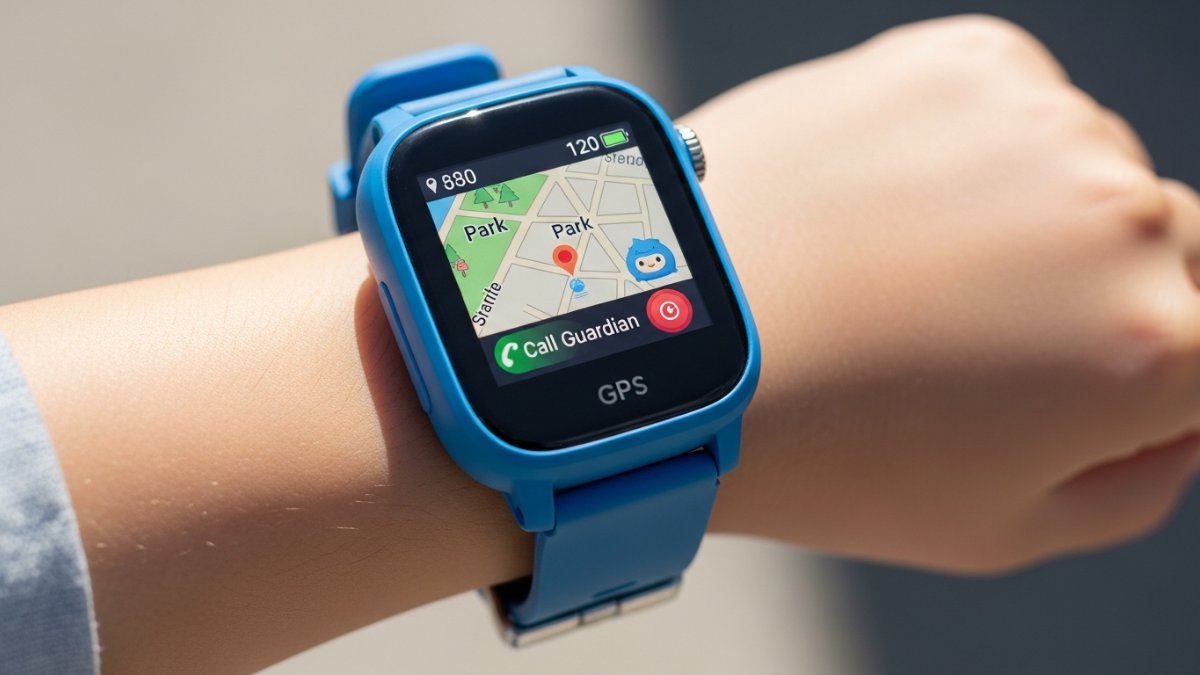
One2track Connect NEXT GPS smartwatch displayed on child's wrist showing touchscreen interface

Discover how the One2track Connect NEXT GPS Smartwatch for Kids empowers children's independence while giving parents real-time location tracking, emergency SOS, and distraction-free communication. Perfect for kids 6+.

Nearly 73% of parents admit they worry about their child’s safety when they’re away from home—yet they struggle to find the right balance between monitoring and granting independence. Every day, families face the same impossible choice: hand over a smartphone loaded with distracting apps and social media, or keep their children completely disconnected. The One2track Connect NEXT GPS Smartwatch for Kids represents a fundamental shift in how modern families approach child safety.

Rather than forcing kids toward devices designed to maximize screen time, One2track engineered something different. The Connect NEXT strips away digital clutter while amplifying what actually matters: real-time communication, precise location tracking, and emergency response capabilities. This smartwatch acknowledges a truth that smartphone manufacturers ignore—children don’t need endless entertainment; they need safety, connection, and the freedom to explore.

Discover how the One2track Connect NEXT can transform your family’s approach to child safety.

The Smartphone Paradox: Why Kids’ Phones Create More Anxiety, Not Less

Handing a child a smartphone seems like the obvious solution to parental worry. You can call them anytime, right? The reality proves far more complicated. When children have smartphones, they gain access to an entire ecosystem designed by engineers whose job depends on keeping them engaged as long as possible. Notifications ping constantly. Social media feeds refresh endlessly. The device that promised connection becomes a source of stress for both parent and child.

Parents who give their children smartphones often report increased anxiety, not decreased. They find themselves monitoring screen time, worrying about online predators, managing cyberbullying incidents, and dealing with the psychological effects of constant social comparison. Meanwhile, children struggle with distraction, sleep disruption, and the pressure to maintain their digital presence.

The developmental cost proves significant. Research consistently shows that excessive screen time correlates with increased anxiety and depression in children. Kids who spend hours on social media develop warped perceptions of reality. Those obsessed with gaming miss opportunities for physical activity and face-to-face social development. The very tool meant to keep children safe often becomes the source of new dangers.

The One2track Philosophy: Essential Communication Without Digital Noise

One2track approached this problem differently. Their smartwatch keeps the features that genuinely matter—emergency communication, location tracking, and approved contact connectivity—while eliminating everything designed to addict. No games. No social media. No infinite feeds pulling attention away from the real world.

This philosophy resonates with parents because it works. Children wearing the Connect NEXT can play outside without a smartphone, go to school without digital distractions, and maintain contact with parents through a purpose-built device. The smartwatch becomes a tool for safety and connection rather than a gateway to digital chaos.

Real-World Scenarios Where a Smartwatch Outperforms a Smartphone

Consider practical situations where the Connect NEXT’s design excels. Your child is at soccer practice. With a smartphone, they might spend the entire hour on Instagram instead of engaging with teammates. With the smartwatch, they remain focused on the game while parents can still reach them in emergencies.

A teenager walks to school across busy streets. A smartphone invites constant distraction—checking messages, responding to notifications, eyes on the screen instead of traffic. The smartwatch keeps communication channels open without compromising attention to the environment. If something goes wrong, the SOS button provides immediate emergency response.

A child develops anxiety about being away from parents. A smartphone becomes a crutch for constant reassurance-seeking, feeding the anxiety cycle. A smartwatch offers genuine safety features without enabling anxious checking behaviors. Parents can verify their child’s location at set intervals, but the child isn’t tempted to message constantly.

Tracking Technology That Actually Works: GPS, Wi-Fi, and Network Triangulation

How the Connect NEXT Combines Three Tracking Methods for Accuracy

The Connect NEXT employs redundancy as its core tracking strategy. Rather than relying on a single positioning method, it combines GPS, Wi-Fi triangulation, and mobile network positioning. This multi-layered approach ensures that your child’s location remains trackable in virtually any situation.

GPS provides the most accurate positioning in open-air environments. Wi-Fi triangulation kicks in when GPS signals weaken—indoors, in urban canyons, or beneath dense tree cover. Mobile network triangulation serves as the final backup, using signal strength from nearby cell towers to estimate position. Together, these three methods create a resilient tracking system that doesn’t fail when one method falters.

GPS Positioning: Accuracy Range and Performance in Urban vs. Rural Settings

In open areas with clear sky visibility, GPS positioning on the Connect NEXT typically achieves accuracy within 5-10 meters. This level of precision suffices for most parental monitoring scenarios—you can reliably determine whether your child is at school, at the park, or at a friend’s house.

Urban environments present more complexity. Tall buildings create signal reflections (known as multipath error), which can reduce accuracy to 15-30 meters in dense city centers. The Connect NEXT’s processor handles these reflections intelligently, but precision does decrease compared to rural tracking. Most parents find this accuracy acceptable for urban use, though it’s worth understanding the trade-off.

Rural and suburban areas see GPS performance closer to theoretical maximum. Open skies and fewer signal obstacles mean accuracy often reaches the 5-10 meter range consistently. For families in these settings, GPS positioning becomes the primary tracking method, with Wi-Fi and network triangulation serving as genuine backups rather than primary systems.

Wi-Fi Triangulation: How It Maintains Location Data Indoors and in Dense Areas

Wi-Fi positioning works by identifying nearby wireless networks and cross-referencing them against databases of known network locations. When your child enters a school building, the Connect NEXT detects the school’s Wi-Fi network and references its known location. The accuracy depends on how many networks are nearby and how recently the database was updated.

In most indoor environments, Wi-Fi triangulation achieves 20-50 meter accuracy—sufficient to confirm your child is inside their school or at home, though not precise enough to pinpoint their location within a building. In dense urban areas with numerous overlapping networks, accuracy can improve to 10-20 meters. The system constantly updates its network database, so performance improves over time as more devices share location data.

Mobile Network Backup: Ensuring Continuous Tracking Even When GPS Signals Weaken

Mobile network triangulation represents the fallback position—the method that always works, even if accuracy drops. By measuring signal strength from multiple cell towers, the system estimates position with typical accuracy of 50-200 meters depending on tower density. In cities, accuracy tightens to 50-100 meters. In rural areas with sparse cell coverage, it may expand to 200+ meters.

This backup proves invaluable during transitions. When your child moves from outdoors (where GPS works) to indoors (where Wi-Fi takes over), the system switches seamlessly. If Wi-Fi is unavailable, network positioning maintains tracking. The redundancy ensures that position data flows continuously to the parent app, never leaving a gap where parents lose track of their child’s whereabouts.

Real-Time Location Updates: Refresh Rates and Parent App Responsiveness

The parent app receives location updates every 30-60 seconds during active use. This refresh rate balances battery life against real-time responsiveness. When you open the app to check your child’s location, you see data no more than a minute old in typical conditions.

For emergencies, this frequency proves adequate. SOS button activation triggers immediate notification and accelerated location updates. The system prioritizes emergency response over normal battery conservation, ensuring parents receive the most current location data when it matters most.

Dutch Data Center Hosting: Security Standards and Privacy Implications

One2track’s decision to host data in Dutch data centers carries significant implications for user privacy. The Netherlands maintains some of Europe’s strictest data protection regulations, with enforcement mechanisms that rival GDPR compliance. By choosing Dutch hosting, One2track positions itself under regulatory oversight from European authorities rather than relying on US-based server infrastructure subject to different legal frameworks.

This choice means your child’s location data never crosses borders to servers in countries with weaker privacy protections. All tracking information, communication logs, and personal data remain within European jurisdiction. For families concerned about data sovereignty and privacy, this architectural decision matters considerably.

Learn more about how One2track’s European infrastructure protects your family’s privacy.

Emergency Response Features That Give Parents Genuine Peace of Mind

The SOS Button: How It Works and What Happens When Pressed

The Connect NEXT’s SOS button serves as the device’s most critical safety feature. When your child presses it—whether facing a dangerous situation, getting lost, or feeling unsafe—the smartwatch immediately initiates an emergency response sequence. The button is large, positioned prominently on the watch face, and designed for accessibility even in stressful moments when fine motor control becomes difficult.

Upon activation, the watch captures the child’s current GPS location and initiates a direct alert to the parent app. This isn’t a delayed notification; the system prioritizes emergency signals above all other traffic, ensuring parents receive the alert within seconds. Simultaneously, the device can initiate automatic two-way communication, allowing voice contact to establish what’s wrong and what help is needed.

Instant Notification System: Speed and Reliability of Parent App Alerts

Emergency notifications reach parents through multiple channels. The primary alert arrives in the parent app with location coordinates. Secondary notifications can be configured to send SMS messages or push notifications to backup contacts. This redundancy ensures that even if a parent isn’t actively monitoring the app, they receive critical alerts through familiar notification channels.

The speed of alert delivery matters tremendously in real emergency situations. The Connect NEXT’s system delivers alerts with minimal latency—typically under 5 seconds from button press to parent notification. This rapid response window can make meaningful differences in outcomes when children genuinely need help.

Two-Way Communication During Emergencies: Voice and Video Call Capabilities

Once an SOS alert triggers, immediate communication becomes possible. Parents can answer the emergency call and speak directly with their child, assessing the situation and providing guidance. The connection prioritizes quality and reliability over all other system functions during emergency calls.

Video calling capability adds another layer of situational awareness. If your child is lost or scared, being able to see what they’re seeing provides valuable context. Is your child at a safe location? Are they injured? Are they with other people? Video calling answers these questions faster than voice alone, enabling more effective emergency response.

Approved Contacts: Setting Up Trusted Communication Channels

The parent app allows configuration of trusted contacts who can receive calls and messages from the child. These might include parents, grandparents, teachers, or trusted neighbors. Only approved contacts can reach the child, preventing unwanted communication from strangers or inappropriate contacts.

The setup process is straightforward. Parents add contact phone numbers and specify permission levels—some contacts might only receive emergency calls, while others might be allowed two-way messaging. This granular control ensures children can reach help from multiple trusted sources while remaining protected from unsuitable contact.

Geofencing and Safe Zones: Creating Virtual Boundaries Around Home and School

The parent app allows creation of “safe zones”—virtual boundaries around locations like home, school, or a trusted friend’s house. The Connect NEXT continuously monitors whether the child is within these zones. When your child enters or exits a designated area, the parent app sends a notification.

This feature provides peace of mind without requiring constant active monitoring. You don’t need to check the app every five minutes; instead, you receive alerts when actual transitions occur. For younger children or those with a tendency to wander, geofencing becomes an invaluable safety tool that alerts parents to unexpected location changes.

Alert Types: Entry/Exit Notifications and Customizable Warning Thresholds

Parents can configure separate alerts for zone entry and exit, or designate certain zones to alert only on exit (like home—you only care that your child left when they shouldn’t have). Customizable thresholds prevent notification fatigue. For a school-aged child, alerts on exit during school hours matter; alerts during authorized after-school dismissal time might be disabled.

The flexibility extends to timing. Certain geofences might be active only on school days, or alert patterns could differ between weekdays and weekends. This customization prevents false alarms while ensuring genuine safety concerns trigger immediate notification.

Testing Emergency Features: How to Verify the System Works Before You Need It

Before relying on emergency features in a real crisis, test them with your child. Practice pressing the SOS button to verify it works and understand the response sequence. Confirm that emergency alerts reach you correctly. Test voice calling through the emergency function to ensure audio quality meets expectations.

This testing process serves dual purposes. First, it verifies technical functionality—you want confidence the system works when genuinely needed. Second, it familiarizes your child with the emergency process. In actual emergencies, panic and confusion are the enemy; practice reduces both. Your child learns exactly what to expect when pressing the SOS button, making the action more automatic under stress.

Communication Without the Complications: Calls, Messages, and Video

Voice Calling: Quality, Battery Impact, and Connection Reliability

The Connect NEXT supports voice calls between your child and approved contacts. Call quality depends on network conditions but generally matches what you’d expect from a modern smartwatch. Audio clarity proves adequate for communication, with built-in microphone and speaker handling typical outdoor use well.

Battery impact from voice calls is moderate. A 30-minute call reduces battery life by approximately 15-20%, depending on network conditions and speaker volume. Extended conversations drain the battery more rapidly than text-based communication, but typical usage patterns—short check-ins and emergency calls—consume minimal battery resources relative to other functions.

Connection reliability relies on available 4G signal. In areas with strong coverage, calls connect promptly and maintain quality. In weak signal areas, calls may drop or suffer from audio degradation. This limitation is inherent to any cellular wearable and shouldn’t deter purchase unless your family lives in an area with consistently poor coverage.

Video Calling Capability: Practical Applications and Bandwidth Requirements

Video calling on the Connect NEXT streams through the device’s built-in camera and screen. It’s not meant to replace smartphone video calls but rather to provide additional situational awareness during important conversations. The bandwidth requirement is modest—typically 1-2 Mbps, easily achievable on standard 4G networks.

Practical applications focus on emergency scenarios and critical check-ins. If your child is lost and needs guidance, you can see what they’re seeing. If your child is injured and describes symptoms, video confirmation helps you assess severity. For routine communication, video calling isn’t necessary; text and voice messaging suffice.

Text and Voice Messaging: Asynchronous Communication for Non-Urgent Updates

Text messaging provides asynchronous communication—your child can send a message when you’re busy, and you respond when available. Voice messages offer a middle ground between calls and text: your child records a brief audio message that you listen to when convenient. Both features conserve battery compared to live calls while enabling timely communication.

The parent app displays all messages chronologically, creating a conversation thread for each approved contact. This structure helps organize communication and allows quick reference to previous exchanges. For school-aged children who need to communicate with parents but don’t require immediate conversation, text and voice messaging prove ideal.

Approved Contact Management: Controlling Who Can Reach Your Child

The parent app provides complete control over which contacts can communicate with your child. You add phone numbers, assign names, and set permission levels. Some contacts might be limited to emergency calls only, while trusted family members might have full messaging privileges.

This control prevents unwanted solicitation while maintaining necessary communication channels. Your child can reach you, grandparents, teachers, and trusted neighbors, but strangers and inappropriate contacts cannot initiate communication. You remain the gatekeeper of your child’s social contact landscape on the device.

School Mode: Automatically Limiting Communication During Class Hours

School mode automatically disables messaging, calling, and non-essential features during designated hours. This prevents classroom distraction while maintaining emergency functionality—if your child needs to call for help, the SOS button still works, but routine communication is blocked.

Parents configure school mode hours in the app, and the smartwatch automatically enables the restriction. This approach teaches children appropriate device use without requiring constant monitoring. The watch enforces boundaries automatically rather than relying on self-discipline.

How Two-Way Communication Builds Trust Between Parent and Child

Communication tools on the Connect NEXT serve a deeper purpose than logistics. They build the foundation for trust and open dialogue. When children know they can reach parents easily, anxiety decreases. When parents can respond quickly, children feel supported. The smartwatch becomes a symbol of connection rather than surveillance.

This distinction matters for healthy child development. A child who feels constantly monitored may develop resentment and secretiveness. A child who feels genuinely connected to parents through reliable communication channels develops confidence and security. The Connect NEXT’s design emphasizes the latter dynamic.

The Distraction-Free Design: What’s Intentionally Missing

Why the Connect NEXT Excludes Games and Social Media Apps

This is where the Connect NEXT fundamentally diverges from mainstream consumer electronics. One2track explicitly designed out everything that makes smartphones addictive. No games. No social media. No notification-driven engagement loops. The device does one job well: keeping families connected safely.

This exclusion isn’t a limitation due to processing power or storage constraints. It’s a deliberate design philosophy. One2track acknowledges that every app installed represents a potential distraction from the real world. Every notification is designed by engineers paid to interrupt your child’s focus. Every game is optimized by psychologists to maximize engagement regardless of impact on development.

Impact on Battery Life: How Removing Apps Extends Usage Between Charges

The minimal software footprint contributes directly to impressive battery life. Without games running processes in the background, without social media apps constantly syncing, without endless notifications demanding processing power, the Connect NEXT consumes battery at a fraction of the rate of a smartphone.

Typical usage yields 2-3 days of battery life between charges. This span exceeds what most children achieve with smartphones, where heavy app usage often requires daily charging. For families with inconsistent charging access—weekend camping trips, extended outdoor activities—the extended battery life proves genuinely valuable.

Focus Benefits: Keeping Children Engaged With Their Surroundings, Not Screens

The psychological impact of distraction-free design proves difficult to overstate. Children wearing the Connect NEXT spend more time looking at their surroundings than at a screen. They engage more deeply with playmates, notice environmental details, and develop stronger observational skills.

Teachers consistently report that children with smartphones exhibit lower attention spans and struggle with focused work. Children with purpose-built devices show marked improvement in classroom engagement. The distraction-free design actively supports child development in ways that smartphone-laden alternatives cannot.

Customizable Clock Themes: Providing Personalization Without Addiction Mechanics

The watch does include customization options—different clock faces and themes allow children to express personal style. This personalization satisfies the legitimate human desire for individuality without triggering the addictive engagement mechanics embedded in app-based customization.

A child can choose a clock theme that matches their personality. They can see it when checking the time—a genuine functional need. But the system doesn’t offer thousands of cosmetic options designed to keep them scrolling, purchasing, or sharing. Personalization exists in service of function rather than as an end in itself.

Screen Time Management: How This Design Philosophy Supports Healthy Development

Modern research consistently demonstrates that excessive screen time correlates with anxiety, depression, sleep disruption, and developmental delays in children. Yet most children’s devices actively maximize screen exposure. The Connect NEXT reverses this incentive structure.

By design, the device encourages minimal screen interaction. Check-in calls or messages take seconds. Viewing location or recent activity requires brief app engagement. The default state is to put the device away and interact with the physical world. This design explicitly supports healthy development rather than undermining it.

Hardware Specifications and Practical Wearability

High-Resolution Touchscreen: Visibility, Responsiveness, and Durability Concerns

The Connect NEXT features a bright, responsive touchscreen suitable for children’s interaction. The resolution suffices for displaying text, maps, and call information clearly. Brightness levels adjust automatically based on ambient light, making the display readable both indoors and outdoors.

Responsiveness is generally good for typical navigation tasks. The touchscreen registers taps reliably and swipes function smoothly. One caveat worth noting: some users report that the screen scratches relatively easily with heavy use. Protective screen protectors are inexpensive and strongly recommended for rough-and-tumble children.

Slim and Lightweight Design: Comfort for Extended Wear on Children’s Wrists

The watch is engineered for children’s comfort, not adult styling. It weighs less than typical smartwatches and features a slim profile that doesn’t protrude awkwardly from small wrists. The band adjusts to fit wrists ranging from quite small (young elementary-aged children) to larger pre-teen wrists.

Most children report the device feels natural to wear after a brief adjustment period. Unlike heavy smartwatches designed for adults, the Connect NEXT won’t fatigue small arms or draw complaints about discomfort. Extended wear—all day at school, throughout outdoor activities—proves comfortable for most wearers.

Water-Resistant Housing: What Activities Are Truly Safe

The Connect NEXT carries an IP67 water-resistance rating. This means it withstands submersion in up to 1 meter of water for 30 minutes. For practical purposes, this protects against splash, rain, and brief dunking in pools or streams.

However, IP67 doesn’t mean waterproof. Extended swimming is not advisable. Saltwater exposure (as in beach use) accelerates corrosion and should be avoided. For typical water exposure—playing in rain, splashing in puddles, brief pool immersion—the rating provides genuine protection. For competitive swimming or daily beach use, the device requires extra caution or removal.

Pre-Installed 4G SIM Card from One2Mobile: Setup Simplicity and Carrier Details

The Connect NEXT arrives with a SIM card from One2Mobile already installed. This eliminates the common friction point of standalone smartwatches: figuring out which carrier to use and how to activate service. Parents simply activate the account through the One2track app, and connectivity works immediately.

One2Mobile offers transparent pricing for 4G data. The service includes generous data allowances suitable for typical smartwatch usage. Most families find the included plan adequate without requiring upgrades, though heavy video calling might require plan adjustment.

Battery Capacity and Typical Usage Time Between Charges

The Connect NEXT packs roughly 600-700 mAh of battery capacity into its slim form factor. This yields approximately 2-3 days of typical usage between charges. Heavy usage—extended video calls, constant GPS tracking—reduces this to 1-2 days. Light usage might extend it to 3+ days.

Charging uses a proprietary magnetic connector that attaches to the watch base. A full charge requires 60-90 minutes. The device supports fast charging, so a 20-minute charge yields several hours of additional usage if needed before a full charge cycle.

Color Options and Aesthetic Appeal to Different Age Groups

The Connect NEXT comes in multiple colors appealing to different age groups. Younger children might prefer bright, playful colors. Older elementary students might gravitate toward sports-inspired designs. Pre-teens often prefer sleeker, more minimalist aesthetics.

This range acknowledges that children care about how their devices look and want devices they’ll actually want to wear. A smartwatch sitting unworn in a drawer provides zero value. By offering appealing color options, One2track increases the likelihood children will consistently wear the device.

Sizing and Adjustment Mechanisms for Growing Children

The band includes multiple adjustment points to accommodate growth. A child can wear the watch comfortably from approximately ages 6-12, with the band extending as wrists grow. By early teen years, most children’s wrists outgrow the standard band, though aftermarket bands designed for the watch are available.

This growth accommodation makes the Connect NEXT a more practical investment than devices requiring replacement as children develop. A single device can serve throughout elementary school, providing several years of use before eventual replacement becomes necessary.

Real-World Performance: Battery Life, GPS Accuracy, and Screen Durability

Battery Drain Patterns: Typical Usage Scenarios and Power Management Tips

Battery consumption varies significantly based on usage patterns. GPS-intensive use drains battery rapidly—continuous GPS tracking might reduce battery life to 1 day or less. Frequent video calling similarly accelerates drain. Moderate use—periodic location checks, text messaging, brief calls—achieves 2-3 days.

Several power management strategies extend battery life. Disabling continuous GPS tracking and instead using periodic location updates reduces consumption. Limiting video calling to necessary situations rather than treating the watch as a video calling device preserves battery. Using school mode during non-essential hours prevents background processes from draining power. Most families find these adjustments intuitive and easily managed through the app.

GPS Accuracy in Practice: Urban Canyons, Dense Forests, and Open Areas

Real-world GPS accuracy generally aligns with specifications, though variation based on environment is notable. In open suburban areas, accuracy consistently reaches 5-15 meters. In downtown urban canyons with tall buildings, accuracy often degrades to 20-40 meters. Dense forests can cause significant deviation, sometimes exceeding 50 meters as tree canopy blocks satellite signals.

Users report that accuracy typically suffices for parental peace of mind. You reliably know whether your child is at home, at school, or at the park. You can identify if they’ve left a designated zone. Pinpoint tracking within 5 meters isn’t necessary for these practical applications. The redundant tracking methods (GPS plus Wi-Fi plus network triangulation) compensate for individual method limitations.

Screen Scratch Resistance: Protective Measures and Replacement Options

The touchscreen is vulnerable to scratches with heavy use. This isn’t a defect but rather an inherent property of protective glass without a hardened coating. Parents of children known for rough handling should apply protective screen protectors immediately upon purchase. These inexpensive accessories dramatically extend screen longevity and prevent cosmetic damage.

If scratches do occur and become bothersome, screen replacement is available through One2track customer support. The cost is reasonable compared to device replacement, though obviously, prevention through screen protectors is preferable.

User Reports on Reliability and Long-Term Durability

Long-term user reports are generally positive. The device demonstrates solid reliability with proper care. Most failures reported occur from physical damage (drops, submersion beyond rated depth) rather than component failure. The 4G connection remains stable, GPS continues functioning accurately, and battery capacity holds throughout the device’s typical lifespan.

Parents report using the same device across multiple years of a child’s development without major issues. Some devices have survived multiple children in families, passing down to younger siblings. This durability suggests One2track invests in quality components despite the relatively modest price point.

Seasonal Performance Variations and Environmental Factors

GPS performance fluctuates seasonally in temperate climates. Winter’s deciduous tree defoliation actually improves GPS accuracy in forested areas, as bare branches obstruct signals less than full foliage. Summer dense tree coverage reduces accuracy in the same locations.

Battery performance is affected minimally by temperature within normal ranges. Extreme cold (below freezing) can temporarily reduce battery capacity, while extreme heat above 40°C can cause damage. For typical seasonal variations in temperate climates, battery performance remains consistent throughout the year.

Comparison of Real-World Performance Versus Manufacturer Specifications

One2track’s specifications prove largely conservative, and real-world performance often meets or exceeds published claims. Battery life estimates of “2-3 days” typically hold true or even extend under moderate usage. GPS accuracy specs are stated conservatively, with real-world accuracy often improving on the stated ranges.

This conservative approach to specifications builds trust. Features that underperform specifications damage brand credibility, whereas devices that perform better than claimed delight users. One2track’s track record suggests confidence in their engineering.

Troubleshooting Common Issues: Connectivity Drops and Location Lag

Occasional connectivity drops typically resolve through device restart or re-pairing with the parent app. Persistent connectivity issues usually indicate either coverage problems in your area or account issues that One2track support can resolve. Most connection problems are temporary and resolve autonomously.

Location lag—where the parent app displays outdated position information—typically reflects either network latency or app caching. Force-refreshing the app resolves most lag issues. If lag persists, it usually indicates connectivity problems that require troubleshooting the underlying network connection.

The Parent App Experience: Monitoring Without Micromanaging

App Interface Design: Intuitive Navigation and Essential Information Hierarchy

The One2track parent app prioritizes information that matters: your child’s current location and recent activity. The main screen displays a map with your child’s position, distance to safe zones, and battery level. Critical information appears immediately without requiring navigation through menus.

The information hierarchy proves intuitive. Location information is most prominent because it’s what parents check most frequently. Battery status is immediately visible because low battery requires attention. Activity history is accessible but not intrusive. This design reflects genuine understanding of parental monitoring priorities.

Real-Time Location Map: Zoom Levels, Update Frequency, and Historical Tracking

The location map supports zoomed levels from street view (showing precise position) to regional view (showing position relative to home and school). This flexibility lets parents get the appropriate level of detail. Zooming in provides pinpoint location; zooming out provides context about distance and direction to familiar locations.

Update frequency matches the refresh rate of location data—typically 30-60 seconds for standard mode. During emergencies, updates accelerate to provide real-time position data. Historical tracking allows review of where your child went during the day, though this data is retained only briefly (typically 24-48 hours) and cannot be used for extended surveillance.

Notification Customization: Tailoring Alerts to Your Family’s Specific Needs

The app allows granular notification configuration. Parents can enable or disable alerts for SOS activation, zone entry/exit, low battery, and other events. Alert types can be customized—some might trigger in-app notifications only, while others send push notifications or SMS messages.

This customization prevents alert fatigue while ensuring genuine concerns receive attention. A parent might disable entry alerts for a school zone (because expected school arrival doesn’t require notification) while enabling exit alerts (because unexpected early departure warrants attention). This intelligent customization transforms the alert system from a source of constant noise into a genuinely useful safety tool.

Device Management: Remote Settings Adjustments and App Updates

Many device settings can be adjusted remotely through the parent app without requiring physical access to the watch. Parents can modify geofences, update approved contacts, adjust alert settings, and enable/disable features without needing the smartwatch in hand.

Device firmware updates are delivered over the air. The parent app notifies when updates are available and manages installation automatically. This approach ensures the device always runs current software with security patches and feature improvements without requiring manual intervention.

Data Privacy: What Information Is Collected and How It’s Protected

One2track collects location data, communication records, and basic device usage information. All data transmits encrypted to Dutch data centers under strict security protocols. Parents have transparency about what data is collected and can request access to their child’s data or deletion of historical records.

The system doesn’t employ behavioral tracking or data sale to third parties. One2track makes money through device sales and service plans, not through data monetization. This business model aligns the company’s interests with user privacy rather than creating conflicting incentives.

Multi-Parent Access: Allowing Both Guardians to Monitor Simultaneously

Families with two parents or guardians can both install the parent app and monitor their child simultaneously. Each parent receives independent access to location, communication, and emergency alerts. This capability proves particularly valuable for shared custody situations or families where both parents travel for work.

Permissions can be customized—one parent might have full access while another has limited emergency-only access. This flexibility accommodates different family structures and communication preferences.

Offline Functionality: What Happens When the Watch Loses Connectivity

When the watch temporarily loses 4G connectivity, it can’t update location data to the parent app or receive incoming calls. However, the device itself continues functioning—the SOS button works, saved music can play (if loaded), and the watch serves as a normal timepiece.

Many families appreciate this graceful degradation. If your child goes out of network coverage briefly, the watch remains functional. It’s not useless, merely without remote connectivity. Once coverage resumes, position data updates and full functionality restores.

Pricing, Value Proposition, and Long-Term Investment

Current Pricing at €104.95: What’s Included in the Package

The Connect NEXT retails for approximately €104.95, which includes the smartwatch, pre-installed 4G SIM card, charging cable, and access to the One2track parent app. There are no hidden fees in this base price. The initial purchase gets you a complete, functioning system.

Compared to GPS smartwatches from competitors, the pricing is competitive or better. Devices offering similar tracking and communication functionality from other brands often exceed €150. One2track’s pricing reflects the company’s Dutch manufacturing background and direct-to-consumer distribution model that eliminates retailer markups.

Comparison with Competitor GPS Smartwatches and Smartphone Alternatives

Entry-level GPS smartwatches from lesser-known manufacturers sometimes price lower (€60-80) but often deliver inferior tracking accuracy and reliability. Established competitor brands typically ask €130-180 for comparable devices. One2track’s €104.95 price point represents genuine value—you’re getting a proven, established product at a competitive cost.

Compared to giving a child a smartphone (€200-600 for decent entry-level models), the Connect NEXT costs a fraction as much. Paired with the elimination of mobile plan costs for the child’s phone, families often save money overall.

Monthly Subscription Costs: Data Plans and Ongoing Expenses

The included One2Mobile plan covers standard data usage. The company offers transparent pricing tiers; most families find the standard plan adequate without needing upgrades. Monthly costs are typically €5-10 depending on plan selection—significantly cheaper than typical children’s smartphone plans.

There are no hidden subscription fees. The parent app is free. Emergency features are free. All core functionality is included. Only the 4G data service incurs ongoing cost, and it’s clearly disclosed and reasonably priced.

Warranty and Support: What One2track Covers and for How Long

The device comes with a standard 2-year warranty covering manufacturing defects and component failure. Physical damage (drops, submersion beyond rated depth) is not covered under standard warranty, though One2track offers affordable repair or replacement options.

Customer support is available through the company’s website and app. One2track’s support team is known for responsiveness and helpfulness. Issues typically receive resolution or explanation within 24-48 hours.