
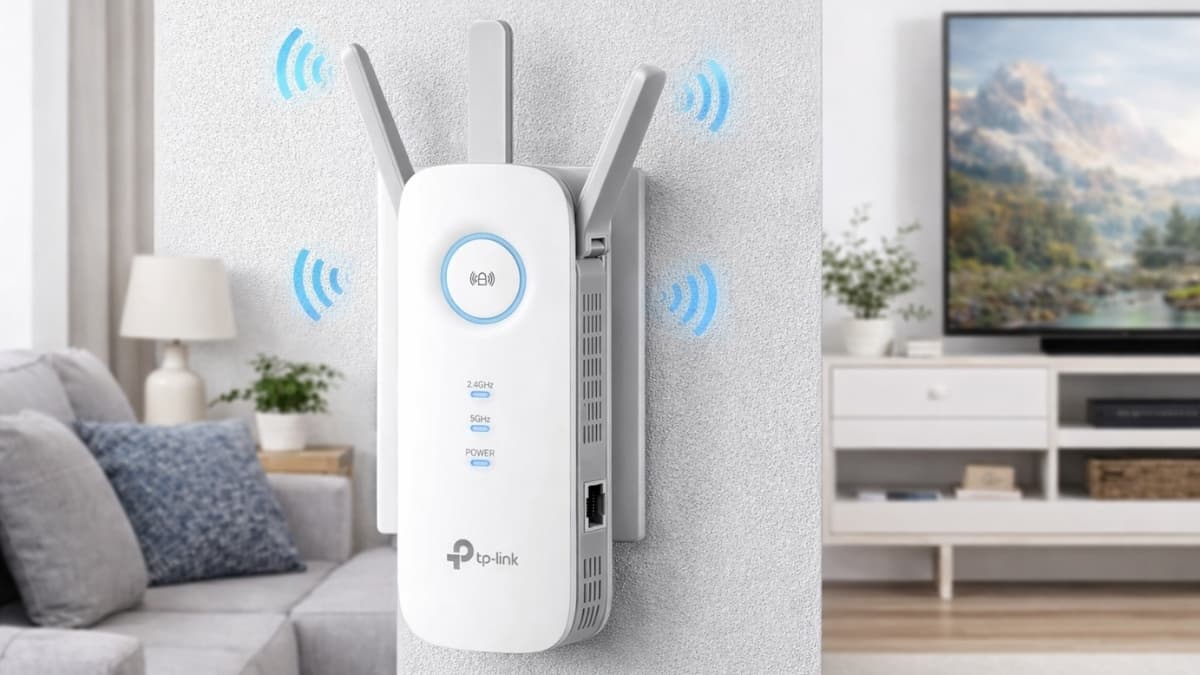
TP-Link AC1900 WiFi Range Extender RE550 boosts coverage, fixes dead zones, and improves streaming, gaming, and calls with fast dual-band WiFi at home today.
Slow WiFi has a way of showing up at the worst moments. Video calls freeze. Streams drop in quality. Pages load forever. These problems often come from weak signal areas, not from your internet plan.
The TP-Link AC1900 WiFi Range Extender RE550 was designed to fix exactly that issue. It extends your existing WiFi signal and pushes it into rooms your router struggles to reach.
This extender targets common problem spots like upstairs offices, back bedrooms, garages, and finished basements. It supports dual-band speeds, strong coverage, and modern home setups with many connected devices.
The goal stays simple. Stronger WiFi where it matters most, without replacing your router or spending a fortune.
TP-Link AC1900 WiFi Range Extender RE550 Overview
The TP-Link AC1900 WiFi Range Extender RE550 is built to expand coverage while keeping speeds stable. It supports dual-band WiFi with combined speeds up to 1900 Mbps. That breaks down to 600 Mbps on 2.4 GHz and 1300 Mbps on 5 GHz.
Three adjustable external antennas help push signal farther and keep connections stable through walls and floors.
Coverage can reach up to 2,800 square feet when placement is done correctly. This works well for medium-sized homes with one or two weak zones.
The extender supports up to 30 connected devices. Phones, laptops, smart TVs, cameras, and smart home gear stay connected without constant drops.
MU-MIMO technology allows multiple devices to receive data at the same time. This reduces lag during busy hours.
A built-in Gigabit Ethernet port allows wired connections for gaming consoles, smart TVs, or desktop computers. The same port supports Access Point mode when connected to a wired network.
Setup and Placement Experience
Setup stays straightforward. The WPS button method works with most routers.
Plug the extender near the router.
Press WPS on the router.
Press WPS on the extender.
Wait for the solid connection light.
Once paired, move the extender toward the weak area. The smart signal indicator helps guide placement. A blue light signals a strong connection. Red means the extender sits too far from the router.
The TP-Link Tether app offers another setup option. The app provides step-by-step guidance, placement tips, and signal feedback. It also allows quick adjustments later.
Correct placement makes a noticeable difference. The best results usually appear halfway between the router and the problem area, with minimal walls or large objects in the way.
Real-World Performance and Speed
In real home use, the extender delivers consistent improvements.
Rooms with no signal before show usable speeds after setup. HD streaming runs smoothly. Video calls stay stable. Web browsing feels responsive.
At close range, 5 GHz speeds stay strong and handle 4K streaming. At longer distances, devices shift to 2.4 GHz for better reach. That transition happens smoothly.
Gaming performance stays reliable. Ping increases slightly compared to a direct router connection, but gameplay remains stable for most online titles.
Multi-device households benefit from the extender’s ability to manage traffic without frequent drops.
Extra Features That Add Value
OneMesh support allows the extender to work with compatible TP-Link routers. This creates a single network name throughout the home. Devices connect automatically to the strongest signal as you move around.
The Gigabit Ethernet port adds flexibility. Wired connections help devices that need stable performance, like streaming boxes or consoles.
The Tether app allows device monitoring, access control, and firmware updates. These tools help keep the network stable over time.
Power usage stays low at around 7.5 watts. This keeps long-term energy costs minimal.
Pricing and Overall Value
The TP-Link AC1900 WiFi Range Extender RE550 usually sells between $48.49 and $59.99. Online listings often average around $54.99. Sale events can drop the price closer to $40.
Compared to similar AC1900 extenders, the RE550 offers strong value. Many competitors cost more while offering fewer features or slower wired ports.
A two-year warranty adds peace of mind and exceeds the standard coverage for this category.
Things to Keep in Mind
This extender uses WiFi 5 technology. Homes with extremely high device counts or multi-gig internet plans may notice limits over time.
The wall-plug design can block nearby outlets. Placement options remain more limited than desktop models.
Performance depends heavily on proper placement. Thick walls, metal framing, and interference can reduce results.
Conclusion
The TP-Link AC1900 WiFi Range Extender RE550 delivers reliable coverage expansion for everyday homes. It works best in spaces with one or two weak areas that disrupt normal use.
Setup stays simple, performance stays consistent, and features cover most modern needs.
For anyone dealing with dropped signals or slow rooms, this extender provides a practical solution without replacing existing equipment.
Take a closer look at the TP-Link AC1900 WiFi Range Extender RE550 on Amazon, and explore other home networking options that may fit your space even better.